BingX Referral Change and Re-registration Guide
✅ Preparations :Please access the sign-up/change link for BingX via new email
1️⃣ RoA Community (www.roacommunity.com), if you have not yet signed up for BingX.
First, you need to create a new account to receive benefits. (*At this stage, do not carry out KYC verification first! Just sign up.)
Make sure that ROA79 is correctly entered in the invitation code field.
Complete your registration with the new email you prepared.
2️⃣ Empty the assets of the existing account (Important! ⚠️)
There must be no assets in the existing account before KYC.
Log in with the existing account (KYC verified).
Close all positions you hold.
Transfer all assets to another exchange.
Please carefully check if the assets are 0 (including leftover coins).
3️⃣ Apply for 'KYC transfer (Identity Transfer)' from the old account
Now, transfer the identity information of the existing account to the new account.
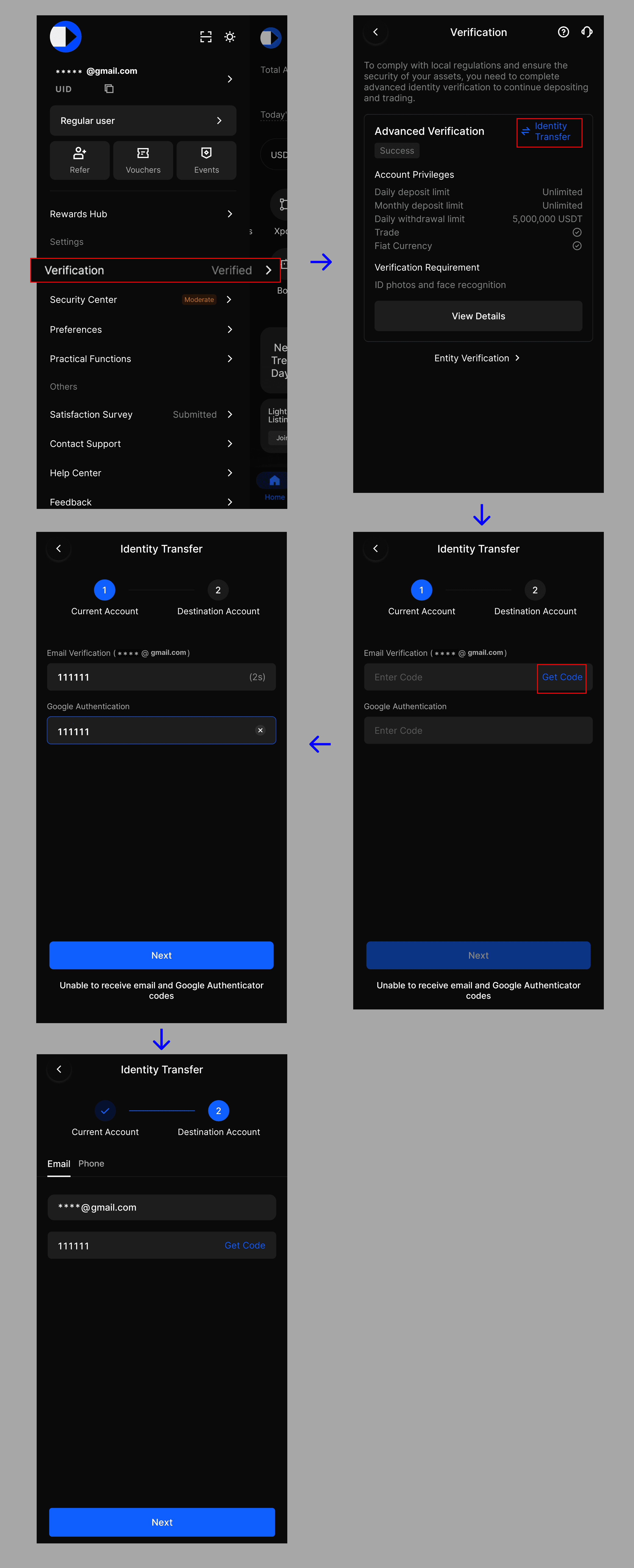
In the existing account (the main account that has completed KYC), click the upper left profile icon → go to the [Verification] menu.
Click the [Identity Transfer] button displayed on the screen.
After KYC transfer, enter the information of the new account (the account created in STEP 1) after verifying the email & Google OTP of the existing account.
4️⃣Completion of transfer and starting trading
'Transfer successful' message will appear, and immediately the KYC of the existing account will be released, and KYC will be applied to the new account. (*Once the transfer account and receiving account are transferred, transfer application will not be possible for 180 days.)
Check the performance of the GN metric after joining/changing your partnership in the Roa community
Copyright (c) by 2026, Roa Community All Rights Reserved.